 Stephanie Lindamood
How to Get ChatGPT to Write in Your Voice, Step by Step
Set Up Your AI
"I'm not very technical." That's the first thing almost every business owner tells me when we sit down to set up their AI. Here's the thing... getting ChatGPT to write in your voice has very little to do with being technical. It comes down to where your information lives and what you tell it. If you use Claude, the same steps work there too, and I've noted where the buttons are different.
Why every chat starts from zero
Picture a computer desktop with every file sitting loose on it. No folders. Screenshots, invoices, that PDF from three years ago... you know it's all there somewhere, and you can't find a thing.
That's how most of us use ChatGPT. Every chat we've ever started sits loose in the sidebar: a trip plan next to a meal plan next to a client email. And when it's all one pile, your AI pulls from all of it when you ask for something for your business.
A project is a folder. Your chats go inside it, like files.
One thing to know: ChatGPT and Claude can now let a project read memory from all your other chats, and that can be on without you realizing it. So the folder isn't sealed until you tell it to be. Turn that off for your business project (step 1 below shows where), and it becomes an office with the door shut. What you say in there stays in there, and it stays together.
Every project has two places to put information:
- Instructions are the sticky note on the front of the folder. These are your must-dos, and your AI reads them before every single reply in that project.
- Sources are the attachments inside. Your price list, your FAQs, longer documents. Your AI looks these up when they're relevant. (Claude calls this Context.)
Think about a new marketing assistant on day one. "Never book calls before 10" and "always copy me on emails" are things they need every single day. Those are instructions. Your price list and brand colors are things they look up when it comes up. Those are sources.
How to get ChatGPT to write in your voice
These steps and screen names are accurate as of October 2026. AI apps change their menus often, so if something looks different, look for the words Projects and Instructions.
-
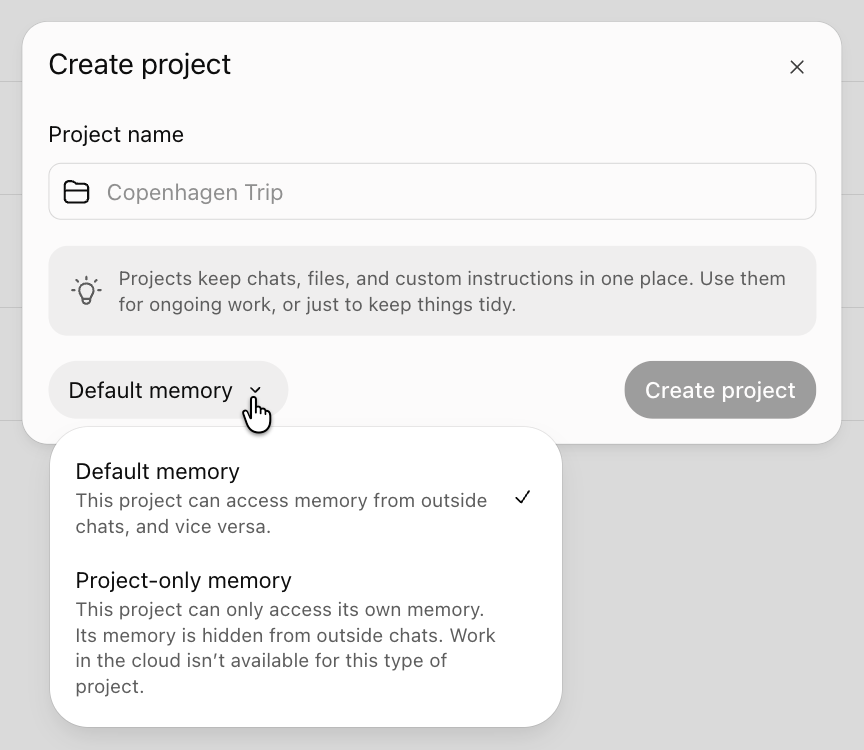
Make a project for your business. In ChatGPT, click Projects in the sidebar, then New project. Before you click Create project, switch Default memory to Project-only memory. That's the lock that keeps your meal plans and trip chats out of your business writing. In Claude, click Projects, then New project, then open it, click View next to Memory and turn off Use account memory.
-
Name your chats. One chat for each kind of work: Weekly emails, Social media posts, Launch posts. Send your first message, then click the three dots next to the chat and choose Rename. Ten seconds now saves you scrolling through forty untitled chats later.
-
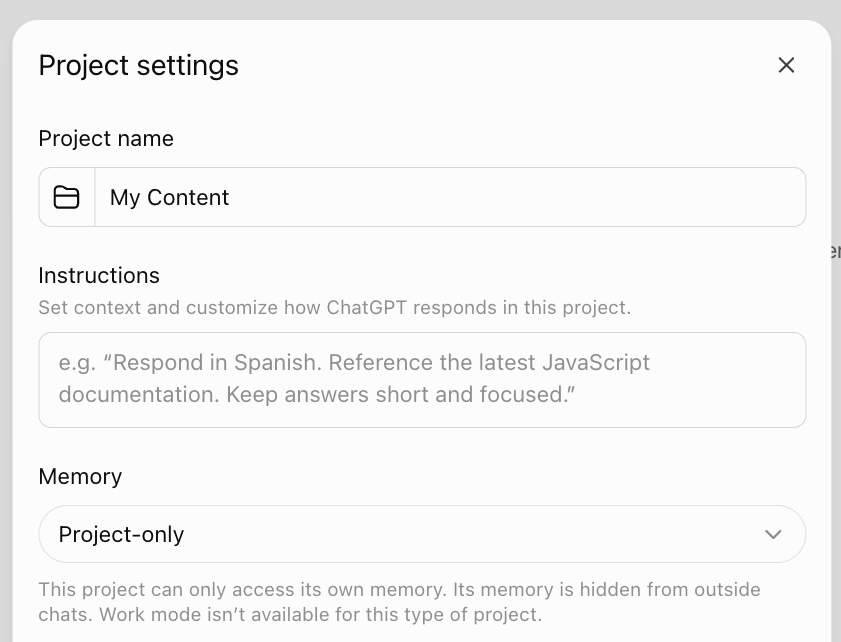
Open your project's Instructions box. In ChatGPT, click the three dots next to the project name, then Project settings. In Claude, find Instructions on the right and click Add. Your AI reads this box every time, so this is where everything else goes.
-
Write down your rules. Every rule you've typed into a chat more than once. "No hashtags." "Sign off with my name." "End with one clear next step."
-
Tell it not to write like AI. Paste this in: "Don't write like AI. No em dashes. No 'it's not this, it's that.' No hype words. No more than five hashtags. Only use emoji I actually use." The free workbook has the full version, with the hype words spelled out.
-
Give it permission to push back. AI is built to agree with you. Paste this in: "Don't agree with everything I say. If something I ask for doesn't fit my voice, my standards or what I believe, tell me plainly and suggest something better."
-
Tell it not to make things up. Paste this in: "Don't make anything up about me or my business. If you don't know something, ask me, or leave a blank in {curly brackets} so I can fill it in." The curly brackets make the blanks stand out, so you catch them before you post.
-
Add your three S's. Substance (what you know), style (how you sound) and standards (what you'd never say). More on each one below.
-
Ask for a post in one line. Open the right chat inside your project and type something like "Write me an Instagram caption about the question my clients ask me most." No explaining who you are first.
The three S's, with an example
Kara is the sample health coach in my free workbook. Here's what she wrote for each one.
Substance. "I ask what time they went to bed before I ask what they ate. Nobody's food is the problem when they've had five hours of sleep." Write down the things you do with every client and never mention, because to you they're normal.
Style. Answer this out loud: you're at a party and someone asks what you do. What do you actually say? Kara says, "I work with women in their forties who are doing everything right and feel like garbage." Try it with the voice memo on your phone. That's your voice.
Standards. "Never 'nourish your body,' 'honor your hunger,' or anything you'd find on a candle." What does everyone in your industry say that you never would? And what do you disagree with?
What it looks like when ChatGPT writes in your voice
Before, Kara had to explain her whole business in every ask, and what came back could have been posted by any coach. After her instructions were in, a one-line ask gave her a caption that opened with her client's own words and ended with her call to action.
Lacey, a travel agent I work with, had ten posts ready for her African safari once her setup was done. In her words: "I never would have been able to generate this, because I always have to start from scratch."
She also keeps a separate chat inside her business project for her newsletter, one for social and one for each trip she's planning. She says it's like having tabs, and she finds anything in about three seconds, even on her phone.
Questions people ask
Where do I find Projects in ChatGPT?
In the sidebar on the left. Menus move around often, so if you don't see it right away, look for the word Projects. In Claude, it's in the sidebar too.
What's the difference between Instructions and Sources?
Instructions are read every single time, so your rules and your three S's go there. Sources are read when your AI decides they're relevant, so longer documents like your price list or FAQs go there.
I already filled in Personalization in ChatGPT's settings. Do I still need this?
Yes. Keep what you have. Personalization is how ChatGPT talks to you, in every chat, including your meal plans. Your project instructions are how it writes as you, for your business.
When a few lines aren't enough
Your three S's will make your AI sound more like you this week. After a handful of posts, though, a few lines run out, and it starts filling the gaps with something generic again. To post week after week, it needs your client stories, the questions people ask you and the way you explain things. That's what The AI Marketing Profile is for. And if you're wondering why your AI sounded so generic in the first place, I wrote about that here: Why ChatGPT Sounds Generic (and What Fixes It).
Want every step with space to write your answers? Grab the free workbook below.